

Forum Replies Created
-
AuthorPosts
-
Trying again to upload.
Attachments:
You must be logged in to view attached files.Ok, Here is a very basic test file.
so if the bmAcrylicBlurBehind is set the the text is visible but very faint. I also noticed that is I open and
close the splitview the text is normal. however is I go to type it disappears again. why is the richedit affected by
the system blur?I really want to use AC but there is some issues that make it not possible.
I realize I am using 16.22, looking at the release notes I don’t see fixes for some of the issues I have run into.
Another issue is the shadow on the splitview. when I resize the form the shadow turns black so my work around was to
refresh the splitview every time the for is resized. I also had issues with text not displaying the font properly.I really like AC and hope this all gets fix, until them its back to devexpress for my ui stuff.
-
This reply was modified 2 years, 11 months ago by
Dennis445.
ok figured it out – skinprovider – system blur in case anyone else gets stuck.
That was it. So simple.
Thank you.I was close it was by pegtop “http://www.pegtop.net/delphi/components/common/”
Here is a screen shot.
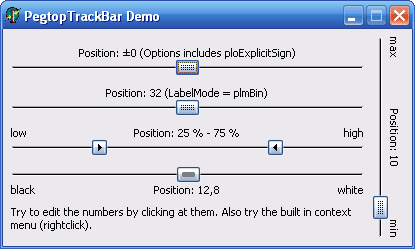
The range slider also has a constraint that binds both slider positions.
I did look at an older component but can't remember where,
it had options to to have 2 sliders with numeric popup input and well as join the two sliders together. it also had an option to work as a colour slider.
I think it was made by peg soft or something like that, I will see if I can find some screen shots.
'Support' wrote:Hello Dennis
You can try to place the TsSkinProvider component on docked forms (if you didn't it still).
If problem is not solved still, then maybe you can send me a demo? I'll try to find a solution.
Sorry for the late reply, I will send you a demo later today or tomorrow.
Thank you
This is not completely solved but am getting closer to finding the solution, it seems the lmd docking themes xml file need to be adjusted not sure what setting(s) but will update
when I discover it. So far it doesn't seem to be an alphaskins problem.
So here is what I have come up with, on v9.00 beta you have to enable extended border in the skin manager for it to work with undocked lmd panels
you don't need to do this with 8.53. also you need to add to the lmd docksite's ondockdrop event sskinmanager1.RepaintForms(true); if you are
using third party controls.
I'm not sure if the RepaintForms is the best a way to go about it but it works for now.
Best regards
Dennis
'mol' wrote:Dennis
Why don't you assign the procedure to the ShellTree's OnClick event dynamically then?
Code:public
TNotifyEvent = procedure(Sender: TObject) of object;procedure TForm1.TreeClick(Sender: TObject);
begin
{…}
end;TFrame1(sFrameBar1.Items[0].Frame).ShellTree.OnClick := TreeClick; // After an instance of the frame has been created
-Uwe
I will have to look in to that, I didn't even think about a notify event.
Thanks again for your help
Dennis
'mol' wrote:What are you doing in the OnClick event? If you don't have to access or manipulate the selected file for example, you could simply write a separate procedure which can be called from both the ShellTree and the main form.
Code:procedure DoSomething;
begin
{…}
end;procedure ShellTreeClick;
begin
DoSomething;
end;-Uwe
Thanks for all the reply's mol, Sorry I don't think I'm explaining myself correctly I don't want to add any code to the frame that contains the shelltree because it's being used as an instance on several other forms that individual manage how the shelltree works.
Thanks
Dennis
I looked at that but it's only useful on the when creating the frame, what I need is to access the shelltree's onclick mouse event outside of the framebars – frame – create event. I would rather have the code on the main form or in a unit instead of on the frames form so far I haven't had any luck.
'mol' wrote:Yeah, it takes a bit of experimentation to find the correct category for third party controls. Just don't take your findings for granted because it might happen that skinning stops working for certain components after an update of AlphaControls. Sometimes it's necessary to change the category after a new release.
HTH
-Uwe
Good to know, I will keep that in mind.
Thanks
'mol' wrote:Dennis,
I use EDIT, and it works flawlessly.
-Uwe
Thanks for the reply I wasn't sure if that was the correct method, for ImageEnMView I have to use grid or the check box's don't show.
Thank you, I very much appreciate the advice.
That works, thank you.
I also want to add that with your code if I wanted to have multiple ext in the tree I extended the “or”
Mask[0] := '.exe';
Mask[1] := '.ini';
CanAdd := AFolder.IsFolder or (CompareText(Mask[0], Ext) = 0) or (CompareText(Mask[1], Ext) = 0);
is this the best way to have several file types show?
Thanks for the reply however I do need it for shelltreeview.
Thanks for your help. I wasn't sure if I needed to add (Internal).
-
This reply was modified 2 years, 11 months ago by
-
AuthorPosts
